Sunday, May 31, 2009

Samsung NC10 insta-review (netbook)

PROs:

  • awesome battery life, the best so far (about 4-5hours in real world; rated at 6hrs)

  • nice 10" display,

  • solid build feel

  • normal hdd, memory card slots, normal lan and vga ports

  • pinch zooming touchpad (can do pinch gesture in IE and zoom in and out)


CONs:

  • small touchpad

  • perhaps a little heavier than dell/hp netbooks (but also makes it feel sturdier built)


Overall: definitely a good netbook and i give it a 9/10.


i liked how long the battery lasted on it and how the keyboard had pitched keys (angled at edges and more space between keys than the dell and hp flush keys). 


vga and lan ports also handy and gives it an edge over the other netbooks that opted to use proprietary adapters. however the smaller touchpad is a bit annoying and the only main negative


for full specs, check out Samsung's official page over here:

Sunday, May 17, 2009

Dell Mini 10 insta-review (xp edition)

PROs:

  • very nice keyboard, and key layout

  • larger touchpad

  • nice display

  • decent sound for a netbook

  • good battery life

  • large normal harddrive

  • hdmi output for hooking up to hdtvs


CONs:

  • touchpad buttons are actually built into touchpad (takes a while to get used to)

  • glossy display hard to see in direct sunlight (but this is normal for glossy displays)

  • normal harddrive so is suspectible to jars/dropping (unlike ssd based netbooks)

  • Function keys require using the FN button to use (again a minor complaint)

  • no VGA-output (can't hook up to most normal computer monitors)


Overall: seamonkey gives a thumbs up to it: 8/10

another good netbook w/a good keyboard layout and larger touchpad area.  initially the touchpad left and right click buttons were hard to get used to since its built into the touchpad itself. however the clicking tactile feedback for them makes it easier to adjust.

the biggest con to the dell mini10 is its lack of a vga out connector for an external monitor; however instead it does have an HDMI output to allow it to hook up to most new hdtvs.

Nice that it uses a normal harddrive and in turn has tons more space for applications.  This netbook falls nicely into the 10" netbook genre with the most common features that seem to define this area: atom cpu, nearly full keyboards, 2 to 3 usb, hdd or ssd (larger for hdd), webcam, memorycard reader.  One defining feature is the hdmi out but this does again come at the cost of a vga out. 

Wednesday, May 13, 2009

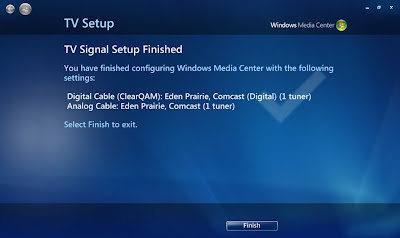
Windows 7 RC, Media Center, and ClearQAM. FINALLY!!

well, i finally broke down and decided to upgrade my vista ultimate installation to windows 7 rc.  i thought i'd help out microsoft and send my installation logs (option when you install) and also do a straight upgrade from Vista Ultimate vs doing a clean install (which i would normally do).

the upgrade went almost too easy and i already found a reason to love Windows 7 and Media Center.  ClearQAM support!  Keep reading for the rest of my initial impressions and see windows 7 media center w/some ClearQAM in action!


Sunday, April 26, 2009

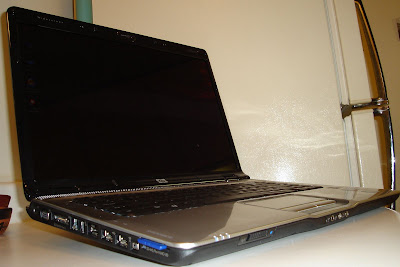
my HP DV6700T + osx leopard, hackintoshing round 2


well, as my tweets may tell; i've decided to redo my os setup on my HP DV6700T laptop. for a little while i was trying (not very hard) to sell my hp laptop since i was using my air or wind more when on the go.  however after realizing the costs of a macbook pro and how much i prob would get for my hp i decided on keeping my hp and in turn relook into hackintoshing it.

last year i tried using a kalyway osx86 distro/installer and had pretty good success except for no builtin wifi, shaddy shutdown/audio issues (you either get working shutdown and no audio, or audio and having to hard power down laptop; doh!) which are two big negatives if your trying to use it as your main os.

however this time i decided i'd try to use a newer distro/installer, iDeneb 1.4 (it also was patched to 10.5.6; another thing that usually broke my setup was updating!).

keep reading for my thoughts, list of working items, tips and a video demo.

update! sd/mmc/ms card reader working (see below)

Monday, April 13, 2009

confessions of a multi-booting geek

yea.  i am one of those geeks.  the type that gets or builds a new pc/laptop/netbook and then tries to cram as many operating systems on it as i can.

at one point in my life i recall having a multiboot setup of 5 different os's. recently i've triple booted my msi wind w/3 os's and my macbook air w/a mere dual boot...

Wednesday, March 25, 2009

Air, OSX and Me: Simplicity can be beautiful (part 2)

well, i admit that the first few times using OS X Leopard (on a hackintoshed pc or the macbook air) was kind of frustrating originally.

being a windows poweruser/geek, i have become accustomed to installshield guides and registry hacking to get my settings and programs running.  however with OS X, installing applications is almost too easy.  just open and drag the app to the Applications folder.  wait? thats all?

yes, simplicity can be a beautiful thing.  this simplicity is shown throughout the whole operating system and applications. in this part 2 i will detail my personal experiences with OS X and the software side of things. again, this is probably a pretty boring read for any OS X hardcore users or power users. 

Friday, March 20, 2009

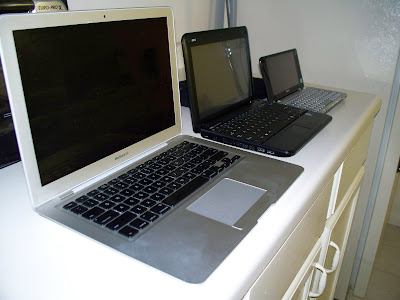
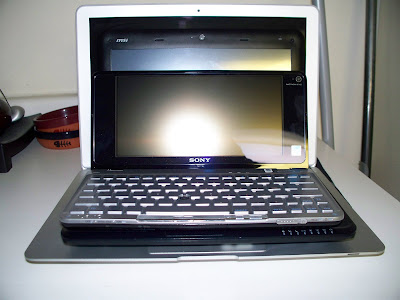
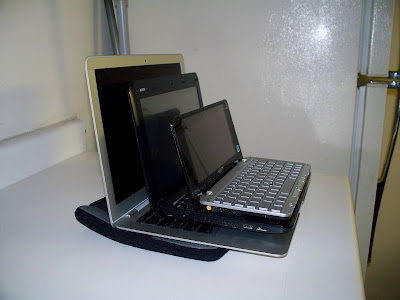
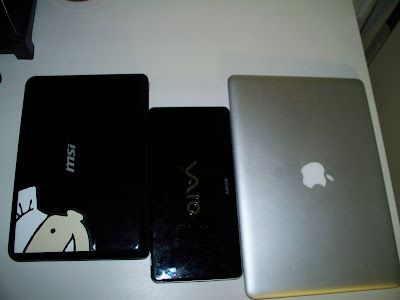
Ultraportable/Netbook Orgy: Macbook Air, MSI Wind, Sony Vaio P (photos)

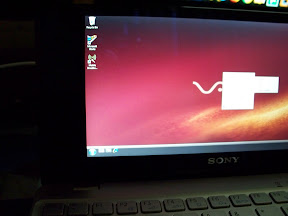
well, at work i'm kind of the netbook guru so in turn i get my hands on the demo units we get.  today, my boss stopped by and handed me a nice fun gift to play with this weekend: a sony vaio p (usa version, 1.3ghz cpu and 60gb pata drive, gps, wifi, wlan, webcam)

so far its an amazing piece of hardware and so tiny!


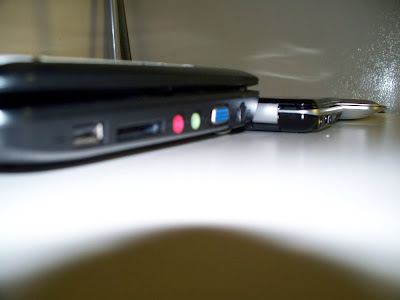
anywho, i hope to post a full review next week after i get a chance to take it for a full spin. until then, i thought i'd tease you with a few comparison pictures w/my macbook air and msi wind. :P


Monday, March 16, 2009

Air, OSX and Me: Re-introductions (part 1)

well, up to now i've yet to really use OS X Leopard (yes, i know OS TEN, hehe) on true mac hardware (closest was my G5 and G4 towers i previously had).

however, Q was looking to upgrade to the this year's revision of the air and in turn sell his rev A, macbook air.  me being the sucker and gadget whore i am took him up on his offer and in turn have now converted to using my air as my main on-the-go laptop.

and well... os x leopard and mac hardware are a pretty good pair. i take that back, an amazing duo!  and yes, the kool-aid tastes pretty sweet.  keep reading for the first gulp and video of me opening up my air.

(this will be a multi-post blog)

Saturday, February 28, 2009

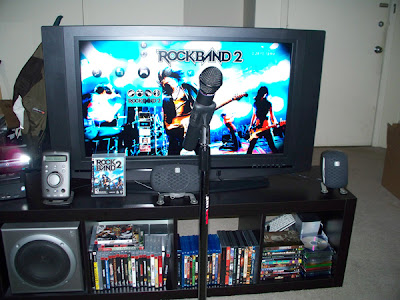
Rock Band and cutting the cable - How to make your own wireless mic setup

well, i am one of those rockband junkies. i have the full setup (previous Rockband instruments) for my PS3.  with Rockband 2, Harmonix updated most of the instruments except for the microphone.  Drums got wireless options, guitars (which already were wireless from day 1) already were, but what about the microphones?

we've been promised the wireless setup and kits by varous third-parties such as logitech and for the xbox360 owners, promised Rockband support for the LIPS wireless mic (but still no patch has been released).  lets change that! after doing some digging, i found out what you really need to get a wireless mic setup.

keep reading for the full details!


Saturday, February 14, 2009

Geek-onomics: 5 tips on how to save a few bucks by being a geek

you don't need to be a financial guru to know that the financial state of the world is not a pretty one at the moment.  so why not use our vast geeky knowledge and resources to help save a few more bucks?

this can be even easier and more realistic lately by industries making the shift to the net.  in this post i plan to outline a few easy ways to save some money in ways you may not have thought of before.  however, like any money saving tip, there are always going to be sacrifices in your choice to save a buck (my disclaimer).  lets get started!

Friday, February 06, 2009

the saturation and full circle back; my netbook thoughts (geek op-ed)

well, 2008 sure seemed to be the year of the netbook.  we had tons of choices and tons of manufacturers (including lenovo and hp) getting into the mix and genre-leaders like Asus and MSI updating their lines and expanding.  already in 2009 we are seeing more and more options and further upgrades being added (incluing new chipsets, atom cpus, gpu's).

the netbook genre is defined by its low price point combined w/portability and in turn has caused a few manufacturers to be worried about profit margins on such a cheap setup.  remember that prior to the netbook craze, sub 12" laptops ran over $2,000 a pop.  however, i believe that 2009 is going to be a year (if the economy cooperates) that the manufacturers get one back. hit the jump to hear this geeks theory.

Sunday, February 01, 2009

basic iPhone / push email in a secure corporate environment (quick read)

at my job, i've been helping in our company's iPhone smartphone rollout and thought i'd perhaps post a few notes/tips on how to setup a secure experience.

first off, i'm no network engineer so i apologize for any discrepencies in hardware i refer to. i'm the techie on the helpdesk that gets it all rolling. :)

we tried to follow apple's plan of attack (found here, pdf) and here's just a quickie on what we did.

Sunday, January 18, 2009

Running HD content from my Wind to my HDTV (video)

so lately there's been news that nvidia is trying to get its mits into the netbook craze by creating a mobile 'netbook' gpu for hd content.  of course, this won't help any of those who have current netbooks and in turn will most likely add more cost to the devices (which in a way defeats the idea of the netbooks original function; cheap and portable internet bigger than a MID and more feature rich).

personally, i believe that the current machines can run HD Content w/o a problem. the only real thing most of  the netbooks need is a quick boost of ram to 2gb and you should be fine running 720p content in vista media center.

i personally convert my dvds to 720p mp4 files that work on my ps3 and in media center/zune player.  these playback fine on my msi wind and fine on my hdtv via vga from my wind.

however, i can see the benefit of adding more gpu options; it would make the netbook into a portable hd streamer/server.  think about it; put in a 500gb sata drive, up the ram to 2gb, add-on a usb ota hdtv tuner and throw on vista ultimate or home premium and you got a pretty portable hd media center. :)  i have yet to try recording hdtv on my wind due to my card being an expresscard tuner (hp hdtv tuner).anywho, to tie you over until they release a netbook w/the new nvidia gpu here's my MSI Wind running 720p video to my HDTV.

[youtube C5XLppmXmkA]

http://www.youtube.com/watch?v=C5XLppmXmkA

Monday, January 05, 2009

Demos: Windows 7 beta build 7000 on a Dell Latitude XT Tablet

well, i work with Dell Latitude XT tablets each day (its really a love/hate relationship; in that i love to hate them, haha!).

with all of this Windows 7 beta buzz in the air i thought i'd throw up one of our Dell XT tablets w/thelatest windows 7 beta build 7000 running.

enjoy!

[youtube hioUYiWlHNQ]

Saturday, January 03, 2009

passing more wind: vista origami experience 2.0 and my touchscreen wind (video)

ok, i promise i'll stop posting msi wind touchscreen stuff soon. however, until then here is a quick video demo of the Origami Experience 2.0 add-on to Vista running on my touchscreen wind. (download it from ms here )

imo, the origami experience 2.0 is a great step towards a more user friendly netbook experience (given it has a touchscreen), the browser alone is much improved over anything to date that runs on windows for such a device (makes it feel like the iphone's safari)

enjoy!

[youtube Mp21JySw6dA]

http://www.youtube.com/watch?v=Mp21JySw6dA