Sunday, February 24, 2008

taking a step back; what was the best upgrade you've purchased for your pc, EVER?

this week i realized that its about time for me to do a desktop system rebuild.  prior to the last year and a half, i had been on an upgrade rampage in regards to my desktop pc.  i initially built my very first desktop system back in 1998; it was an AMD Athlon (Slot A) 999mhz cpu w/ 512mb pc133 memory, a whooping 20gb harddrive and dvd/cd-rw combo drive and cost about $400 to build. 

through my upgrade bender i went through about 12 different computer cases, 10 motherboards, 6 video cards, and 3 monitors.   so with all of the components i went through, what was the best upgrade? 

my Dell 24" LCD Monitor hands-down!


i don't know if you have ever used a 24" widescreen monitor before but lets just say once you do you'll never go back.  i have friends who own/use crappy little 15" crt monitors or a 17" lcd and it baffles me on why one would not upgrade the one thing he/she uses each day?  if you have to use it or do use it on a daily basis, why not make it more enjoyable and better on the eyes?

i've had my dell for about 2 years now and would consider it to be the best pc upgrade ever.  prior to my dell 24" widescreen, i had a very decent standard 19" Lcd but it still wasn't enough desktop space for the stuff i was doing (photoshop, video editing/mixing, gaming, geeking).  my work 20" widescreen just doesn't seem the same, however having two of them does help though... :)

so, whats your best/favorite pc upgrade you've done? feel free to share in the comments. ;)

Thursday, February 21, 2008

PSP CFW 3.90: themes and using the network update feature (video)


if there is one name in the PSP hacking world that almost everyone knows, its Dark_Alex..Dark_Alex imo is a pure PSP coding genius.

up until CFW 3.90 M33 was released, i did my CFW updates manually by putting the installers on my duo... however, with 3.90 M33, i've decided that to update to M33-2 via the Network Update feature.

keep reading for the embedded quick vid on doing the update and me rambling on about PSP and PS3 connectivity.

Tuesday, February 19, 2008

shaking a bad habit; turning off of my HDTV DVR and HDTV service

For those of you that have been living under a rock the last few months TV has been pretty bad since the Writers Guild went on strike.  So there hasn't been any new episodes on network TV since late 2007.   Many people and sources have discussed the seemingly decline in people watching TV as a form of entertainment; it seems more and more people are playing video games or watching movies w/the lack of new network tv.

 so after getting my Comcast bill last week and then realizing that i'm paying over $100 a month on cable and HDTV that i haven't watched for over 3 months; i called Comcast and did it.  i dropped my HDTV DVR and cable tv service (minus basic cable, since i needed that for my internet).  So HA! in your face network TV and Comcast! 

Tuesday, February 12, 2008

my new desk internet radio.. err.. my sony psp


If you don't mind me asking, how do you use your PSP?  do you game on it mainly or use it for movies or music? or is it your portable emulator?

 I use my PSP for almost everything besides gaming (PSP games that is).  Honestly, I have yet to really be blown away by any game yet.  I really liked Hot Shots and was addicted to it and thought GTA was pretty cool but wouldn't cause me to buy a PSP for it.   So, what do i use my PSP for? how do i use mine?

Thursday, February 07, 2008

the death of my sony dsc-t9... and pics of its guts!


well, sadly after nearly 2 years, my Sony Cybeshot DSC-T9 finally died.  of course, it had to be the first day on my vacation in Mexico and caused by me jumping into the ocean and landing on my camera and the sport/waterproof housing... (note to self, not seamonkey-ass proof though..)  

salt-water and electronics do not go very well, but even though my camera's lcd did not light up and only turned on by opening the front cover and then powering on; it still took some decent shots and video. 

however i decided that after i got back from my trip, i would put it out its misery and 'try' to fix it by a nice disassemble of my Cybershot DSC-T9.. btw, i didn't fix it... but am now waiting for the Sony Cybershot DSC-T300 (has the BIONZ sensor which is in the SLR versions) to be released in Mar and hopefully go down a bit i apr.  in the meantime, i'm trying to get me a used DSC-L1 to tie me over till apr (just a 4mp but its so nice and tiny and took great pics, i had one a while back).

anywho back to the disassemble, pics and notes below.  enjoy!

Tuesday, February 05, 2008

My PS3 and PSP w/CFW 3.90 and remoteplay (video)

todays video post will be a look at my PS3 running v2.10 firmware and my PSP running CFW 3.90 M33 (Dark Alex styled) and Remote Play. 

i'll be honest and admit that i've contemplated selling my PSP on quite a few occasions but right when i'm about to break down and do it, i stop myself.  the main reason i always stop myself is the potential for its bonding w/the PS3 and Remote play.  Only a very few games even support remoteplay and gaming (Lair supports remoteplay, you can play Lair on your PSP w/remoteplay) and if your running CFW its a hit or miss game depending on if a sony ps3 update will change code related to remoteplay apps (like last update and cfw 3.70, however there were ways around that).

anywho, the video below just shows a few of the newer features of the remoteplay including using the Gaia screensaver for music. 

Tuesday, January 29, 2008

you know your a geek when....

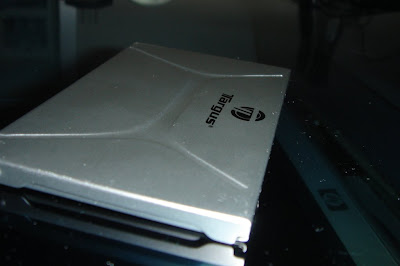
you have a shiny case to carry around your memory cards and sim card.. :P

Targus Memory Card Case (metal, retail $15-25 depending on retailer)

  • holds 2 memory cards

  • fits/holds: CF, MS, SD, MS Duo, XD, and SIM cards (loosely)


Monday, January 28, 2008

Quick Look: Sprint HTC Touch (video)

Hello everyone. As previously promised, today's post will be another newer, hardware review. This time we will be taking a look at Sprint's HTC Touch. The Touch has been out for a few months and at times has been called the 'corporate iphone' due to it being a purely touchscreen pda (no hardware keyboard) and running WM6 (in turn, allows outlook/goodlink to be installed).

Here are some basic/quick specs:

  • 400mhz qualcomm cpu

  • 2.8" 65K TFT LCD

    • 240x320 resolution

    • landscape and portrait modes.


  • 128 RAM, 256MB Flash ROM

    • (avail to user: 73/256mb respectively)


  • Cellular: CDMA dual band, EVDO Rev. 0 and 1XRTT data

  • Bluetooth 2.0 spec

  • 2.0 MP camera / video recorder

  • microSD slot (SDHC supported)

  • tethering via BT or USB cable to laptop/pc (supports PAN bluetooth profile and bt dialup also)

  • Windows Mobile 6 Prof Ed.

    • includes Mobile Office, IE, Outlook, HTC's Today Screen and launcher software and more)


  • See Sprint.com for more/full details


I got about a full day to play and use the HTC Touch. Unfortunately I did my video quick look before really getting my hands on it. :) So lets take a look at the Touch and my quick look video. Read more and view the vid. (and yes, i do get a bit excited w/new toys.. hehehe).

Tuesday, January 22, 2008

geek porn: quick look at a Dell Latitude XT tablet pc (video)

i love my job, that is my non-digital job at the firm in tech support. recently i've been getting my chance to play with TONS of cool ultraportable laptops and also a few cool new smartphones. however, today we got in two versions of a tablet i've been eyeing since its leaked spec sheet last year; the Dell Latitude XT Tablet PC. the fact that i'm the known uber gadget geek in the office really makes it easy for me to tryout the new hardware we get the first day it comes in and thus this post.

Monday, January 21, 2008

data backup project: backing up to an external drive and making it bootable

i love my data and information and would be pretty lost if my system did die on me. however, as a geek that sees and fixes a ton of computers that will die without any warning i always recommend that everyone should do a complete backup each month or so of any data that they believe to be essential. if you use it everyday, that is what i classify as essential (ie calendar, outlook pst files, favorites/links, music, papers/docs, program installation files, serial/registration info).

this weekend i finally decided to go and purchase a nice 500GB external HDD to do my monthly backups and archivals to. prior to this weekend, i was making 5 DVD backups of my personal data (no apps or music) and then storing them at my bank box in my parents town (remote location, another good thing to think about). however i realized that i have a ton of other 'bulkier' data that i wanted to archive/save but didn't want to burn 100 DVDs to do it, thus the external hdd.

Sunday, January 20, 2008

my ps3 and adding music album art (video)

this year i've decided to take up a few of my older projects that i never really got very far on.  another one of those projects was ripping of all of my movies from dvd to a high-quality digital format, such as wmv-hd or divx-hd or mp4.  with the latest firmware updates adding support now for more of the HD formats such as divx and wmv, i figured i finally had a device which would be worthy of hosting my fav movies.  plus, i had previously converted a few movies to avi and mpg as a test and loved being able to quit out of a game and go into a movie. 

here's a quick tip on how to get album art added to your music (sadly, it is a manual process but works pretty well and is done on the ps3).  read more to see the video.

Tuesday, January 15, 2008

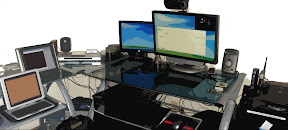
a geeks throne.. my desk..


this is my throne..  that i geek from!

read more to see my specs.. i promise, i won't tell.. ;)

Monday, January 14, 2008

where are the cool watches?? dick tracy would be disappointed...

i remember as a kid loving watches.   the telememo watches by Casio back in the day was the 'coolest' gadget this geek could ever play with as a 10 yr old.  as a kid, i had prob about 12 different watches; including the Nintendo Super Maio 3 and Tetris game watches (still have and they work), several Casio telememo watches, a few traditional windup pocket watches, and of course the usual cheap $5 digital watch.

in the late 80s and early 90s, watches were a pretty common accessory that almost every single person had.  however as cellphones started to become mainstream and used by almost everyone, the wrist watch really started its downward spiral into obscurity and in turn being mainly just a 'fashion' accessory versus being a functional accessory.

so i ask this, where the hell are the cool watches?? no, i don't mean the ones that require me to learn a whole new language or time system or ones that have a mp3 player built in or gps ( http://www.thinkgeek.com/gadgets/watches/ ).

nope, all i want is this:

a stylish watch that can:

1. display the time

2.be able to glow when i have an incoming call on my phone

3. show me if there are any wifi networks and the signal strength

4. and have the time display be customizable (diff colors or backgrounds)

Thats all i ask for!!  these are all reasonable and doable tasks since we have pens that show when you have a call, wifi network detectors built into clothing now. 

oh yea, at the watch should not cost more than $100 since well... it is only a watch when it comes down to it. :)

EDIT: thinkgeek.com did have a wifi watch; http://www.thinkgeek.com/gadgets/watches/9313/

but add a style like this concept and add bluetooth/mobile phones - http://gizmodo.com/344455/watch-concept-gives-hearing+impaired-people-a-fire-alert and keep the price under $100 and i'm sold!

Saturday, January 12, 2008

my Motorola WR850G v2 and DD-WRT firmware and my personal public wifi project

happy 2008 everyone! (yes, i'm a bit behind already, and the year just started!)

this year i've decided to try to give back more to the community and the public as a whole; last week i started it off by donating blood and at quitting smoking cigarettes. this week, i've decided to unshackle the chains on my wifi network/internet access and in turn open it up to the public or those in my area. the main reason behind this was because of my gratitude to whoever's unsecured wifi network i had to use for 2 days when my own internet was down. i realized that without that connection, i would have been pretty lost since i rely perhaps a bit too much on my internet connectivity (yes, i could have tethered my phone to my desktop via bt or usb but doing it w/my PS3 would have been a bit more complex and prob very laggy).

Wednesday, January 09, 2008

2007 recap: the year of the game and firmware battles

Happy New Year to everyone!  This last year was a pretty crazy year in regards to technology, gaming and being a geek.  Today's post will be a personal recap 2007, and what i thought was the biggest trend from it.

2007: The year that gaming really went mainstream?

2006 yielded an estimated 12 billion dollars in revenue for the video game industry however 2007 could end up being an even better year.  This year we saw the X360 sales thrive (not counting japan of course) w/the release of much the anticipated Halo3 (which itself set a record for most copies sold on release for any media; movie, music, game).  We also saw gaming go mainstream with the help of the casual gaming system, Nintendo's Wii (ie money printing machine, hehe).   Sony's PS3 also started to pick up steam in sales with the price drops and release of two new models; however the PS3 was/is still trailing the pack in sales but has seemingly helped the next-gen format war for blu-ray vs. hd-dvd (x360 did not include the hd dvd, optional drive vs sony making blu-ray a requirement in the ps3).