yes, i am among the 'lacks a sense of direction' types when it comes to driving in new places and in turn have a navigation system in my car.
i went the factory option since 1) it was covered under warranty 2) very seemless integration and a good system 3) gave me a SD card reader via a pc card slot
at the time the benefits outweighed the negatives (cost was only negative at time). they have for some time, however this year i decided to update my maps for my navigation system and thus this post. more ranting after the jump.
Saturday, December 27, 2008

Tuesday, December 23, 2008
MSI Wind Hoda touchscreen kit install notes/video
previously on my blog; i had posted about my solderless touchscreen kit i installed on my msi wind. as promised, i am following up with a more detailed notes on installing and a few videos i took of myself doing the install.
the hoda touchscreen kit was made by fidohub.com and being sold on ebay or directly through their website; also there is an ongoing forum thread over at msiwind.net on this particular kit which me and quite a few other users have posted notes on the installation.
this isn't true step-by-step guide/video but more of a general overview of what you will need to do and a few quirks i ran into while installing.
keep reading for the full post with videos and a demo in osx and vista.
the hoda touchscreen kit was made by fidohub.com and being sold on ebay or directly through their website; also there is an ongoing forum thread over at msiwind.net on this particular kit which me and quite a few other users have posted notes on the installation.
this isn't true step-by-step guide/video but more of a general overview of what you will need to do and a few quirks i ran into while installing.
keep reading for the full post with videos and a demo in osx and vista.
Monday, December 15, 2008
msi wind + solderless touchscreen kit = project time!
well, to my geeky delight i arrived at work today and had a little surprise awaiting me at my desk: my msiwind solderless touchscreen kit!!!
i ordered the kit from ebay after seeing it being posted on the front page over at msiwind.net ( a direct link to Hoda's page is here )
the biggest selling point of this touchscreen kit is the fact that it is solderless and also adds additional internal usb connections for other possible mods (ie integration of a gps dongle or perhaps even an internal 3G card?).
so, how hard was it to install? was it worth it? lets find out! keep reading for the setup notes and a video.
i ordered the kit from ebay after seeing it being posted on the front page over at msiwind.net ( a direct link to Hoda's page is here )
the biggest selling point of this touchscreen kit is the fact that it is solderless and also adds additional internal usb connections for other possible mods (ie integration of a gps dongle or perhaps even an internal 3G card?).
so, how hard was it to install? was it worth it? lets find out! keep reading for the setup notes and a video.
Thursday, December 11, 2008
my geeky december thoughts, follow-ups, projects...
well, its been a few weeks since my last post again and i thought i'd check in as the holidays approach ever faster. its been a while since i've blogged about my previous laptop purchase, HP DV6700T CTO so i thought i'd do a quick recap/followup on it.
also, thought i'd drop a few notes about some upcoming projects i have in the works (most of them involving my new fav netbook, msi wind).
also, thought i'd drop a few notes about some upcoming projects i have in the works (most of them involving my new fav netbook, msi wind).
Tuesday, November 04, 2008
my msi wind and osx audio workaround (plantronics audio 480)
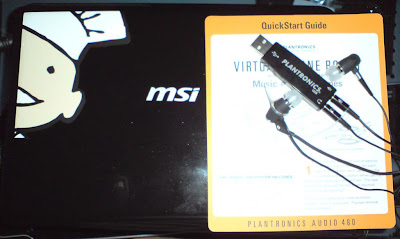
(thanks Q for the skin!)
if you have a msi wind and are running OSX Leopard on it, you probably have found out that yes the speakers work but the mic and headphone jacks do not.
as of right now, there is
so, what do you do if you still want to be able to use headphones and a mic? do what i did, get an OSX compatible usb audio device; keep reading for a quick demo of the Plantronics Audio 480 System (newegg link approx $50)!
Monday, November 03, 2008
my video MP4 tagging and zune tip!
MP4 video files are the new mp3 of video or so it seems. my psp, iphone and ps3 all use these type of files while numerous other devices do too (appletv, xbox360, cellphones, ipods, zunes, etc).
After finally deciding to upgrade my PS3's harddrive (again) to a 500GB drive, i decided to start tagging my mp4 movies. i've been using the Zune software and iTunes as my main music/video players lately. so by instinct i updated all of the metadata for my mp4 videos in the zune software.
later that day, i came back and imported a tagged file into iTunes and did not get any of the metadata transferred over. i then started looking into other apps to do this; however after doing some digging in the zune software found the problem or quirk.
when you update metadata in the Zune software player, the player itself will have to recreate the mp4 file w/the tag info for it to properly tag. so if you tag about 70 some movies like me; you have to wait quite sometime for all 70 files to get the metat data updated. i found this by going to my movie folders and seeing a mp4DC.tmp file that kept growing and then resetting and would eventually be identical in size to my mp4 files.
i believe that the zune player is updating the container which in turn houses the metadata info so it has to offload the video while it does this (?? i'm guessing here). So just be sure to leave Zune open after updating metadata!Â
this also will expain why your pc may seem like its working really hard after you imported your full mp4 library into the zune software. (noticed it on my wind and was worried my harddrive was about to die).
After finally deciding to upgrade my PS3's harddrive (again) to a 500GB drive, i decided to start tagging my mp4 movies. i've been using the Zune software and iTunes as my main music/video players lately. so by instinct i updated all of the metadata for my mp4 videos in the zune software.
later that day, i came back and imported a tagged file into iTunes and did not get any of the metadata transferred over. i then started looking into other apps to do this; however after doing some digging in the zune software found the problem or quirk.
when you update metadata in the Zune software player, the player itself will have to recreate the mp4 file w/the tag info for it to properly tag. so if you tag about 70 some movies like me; you have to wait quite sometime for all 70 files to get the metat data updated. i found this by going to my movie folders and seeing a mp4DC.tmp file that kept growing and then resetting and would eventually be identical in size to my mp4 files.
i believe that the zune player is updating the container which in turn houses the metadata info so it has to offload the video while it does this (?? i'm guessing here). So just be sure to leave Zune open after updating metadata!Â
this also will expain why your pc may seem like its working really hard after you imported your full mp4 library into the zune software. (noticed it on my wind and was worried my harddrive was about to die).
Tuesday, October 14, 2008
HowTo: multibooting XP, OSX and Linux (tips and video) on a MSI Wind
well, after struggling with a bad dimm of memory in my MSI Wind; i am back on the Wind booting path. :)Â
previously i had setup my MSI Wind to triple boot XP, Vista and OSX Leopard however i've been receiving quite a few remarks and comments on my triple booting video about 'why no linux?' on the Wind.Â
So, today's post will be for the Linux/Ubuntu fans out there that want to see how the Wind performs w/Ubuntu 8 on it. in this post, i hope to highlight some tips and a general plan of attack on doing a triple boot setup of OSX, XP, and Ubuntu on the Wind (concepts are applicable to other netbooks/laptops/computers).
keep reading for the video and details!
previously i had setup my MSI Wind to triple boot XP, Vista and OSX Leopard however i've been receiving quite a few remarks and comments on my triple booting video about 'why no linux?' on the Wind.Â
So, today's post will be for the Linux/Ubuntu fans out there that want to see how the Wind performs w/Ubuntu 8 on it. in this post, i hope to highlight some tips and a general plan of attack on doing a triple boot setup of OSX, XP, and Ubuntu on the Wind (concepts are applicable to other netbooks/laptops/computers).
keep reading for the video and details!
Monday, October 13, 2008
my iPhone 'must-have' apps list (app store and cydia)
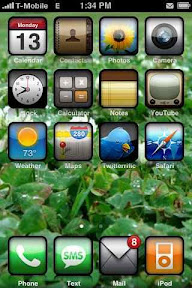
well, i admit it. i love my iphone. don't let my sony ericsson comrades know or my fellow blackberry addicts!
i received my first gen iPhone from my tech-rx bossman Q, about two months ago now and haven't looked back since. at first, i thought i'd get bored with it or annoyed at not having a physical keyboard. however its two months later and i'm still using my iPhone as my main phone.
sure, its not a perfect phone (no picture messaging, copy/paste, no video recording, meh-camera quality), but its pretty close given the proper applications. So, what applications (official App Store and unofficial Cydia) do i have on my iPhone? i thought you'd never ask! keep reading for my must-have list!
Thursday, October 02, 2008
MSI Wind and Triple Booting, Round 2. XP, OSX Leopard, and Ubuntu (video)
well, this week has been a busy week of MSI Wind installs and videos. i thought i'd follow up my previous MSI Wind triple boot video w/my latest one.
this time around i decided to skip Vista and instead use Ubuntu 8 as my third OS (XP and OSX Leopard of course being the other two). here is a quick video of my first boots to each OS. check back on the weekend for a quick run-through on how to triple boot your MSI Wind.  keep reading for the embedded video.
this time around i decided to skip Vista and instead use Ubuntu 8 as my third OS (XP and OSX Leopard of course being the other two). here is a quick video of my first boots to each OS. check back on the weekend for a quick run-through on how to triple boot your MSI Wind.  keep reading for the embedded video.
Monday, September 29, 2008
I've got a fever... msi wind hdd and memory upgrades (video)
yes, i admit it. i now am in love with my MSI Wind netbook. so far it seems to have met all of my mobile computing/commuting needs: small, fast, affordable, upgradable. for $550, you get a pretty nice piece of hardware: 1.6ghz Atom, 1Gb DDR2, 80GB HDD, BT, Webcam/Mic, SDHC reader, 3 usb, nearly full keyboard.
nonetheless if your like me, your prob thinking 'hey, i could use more space and memory' and 'warranties are for wussies'; hit the jump for the howto vid. :)
nonetheless if your like me, your prob thinking 'hey, i could use more space and memory' and 'warranties are for wussies'; hit the jump for the howto vid. :)
Sunday, September 14, 2008
my msi wind, osx leo and vmware fusion demo (video)
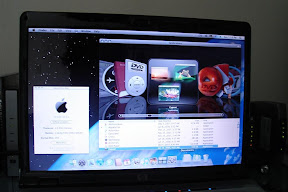
well, a few weeks back i posted a video on triple booting my MSI Wind with XP Prof (nlited), Vista Ultimate Ed, and OSX Leopard (10.5.2) and have noticed people have been looking for more info and videos on OSX running on it.Â
this weekend i decided i'd record a quick video of my msi windmacbook and how garageband and vmware fusion runs on it(Unity works!). my wind again does have a 250gb hdd, dell truemobile wifi card, 2gb total memory and voided warranty. ;) read more and view the full post for the video, enjoy!
Wednesday, August 27, 2008
sticking it to the man: jailbreaking and unlocking the iPhone
so yes, i did in a way sell out by getting an iphone (first gen, thx Q!!). however i know for sure i wasn't going to go as far as to sell my cellular soul to ATT for 2 years. i now have about 2 months or so left in my contract w/T-Mobile and plan on going month to month from here out (if possible).Â
so... what good is an iphone thats locked to ATT when i'm on Tmo? not much, lets change that! keep reading for the screencast.
so... what good is an iphone thats locked to ATT when i'm on Tmo? not much, lets change that! keep reading for the screencast.
Tuesday, August 19, 2008
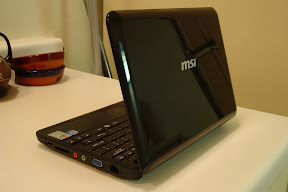
my MSI Wind; i'll take a triple please (video)
2008 sure seems to be the year of the netbook/ultra-portable laptop.Â
 Asus was the first manufacturer, founding father/mother of the new and now very popular netbook category. Asus introduced its Eee PC in late 2007 with the 701 based model. Following the huge success and praise for such a small and affordable sub-notebook, tons of manufacturers began working on their own 'Eee-killer' netbook.
I had purchased an original EeePC 701(w/4GB SSD, Black, Webcam/Mic version) early in 2008 but after using for a month or so i ended up selling it. The main reasons for selling was its tiny keyboard. Performance and boot-up times on it were amazing and the form factor was great for such a low price tag.Â
After selling my Eeepc to a co-worker, I decided I'd wait this one out a bit more and be a little smarter (ie not impulse buying.. hehe) and wait to see how the Intel Atom based netbooks looked.  HP's Mini Note was tempting but the whole Via cpu not an Intel was a huge factor against it and the reason why I went with my MSI Wind. Keep reading for more details and the video demo!
 Asus was the first manufacturer, founding father/mother of the new and now very popular netbook category. Asus introduced its Eee PC in late 2007 with the 701 based model. Following the huge success and praise for such a small and affordable sub-notebook, tons of manufacturers began working on their own 'Eee-killer' netbook.
I had purchased an original EeePC 701(w/4GB SSD, Black, Webcam/Mic version) early in 2008 but after using for a month or so i ended up selling it. The main reasons for selling was its tiny keyboard. Performance and boot-up times on it were amazing and the form factor was great for such a low price tag.Â
After selling my Eeepc to a co-worker, I decided I'd wait this one out a bit more and be a little smarter (ie not impulse buying.. hehe) and wait to see how the Intel Atom based netbooks looked.  HP's Mini Note was tempting but the whole Via cpu not an Intel was a huge factor against it and the reason why I went with my MSI Wind. Keep reading for more details and the video demo!
Wednesday, August 13, 2008
Apple iPhone and Blackberry Curve/8830 -- The Comparison
Apple’s iPhone has been out now for sometime; long enough for Apple to release a second version, the 3G iPhone. Prior to the 3G iPhone release, Apple had not really tried to push its ‘jesus’ phone into the corporate landscape; however with the 3G model Apple in turn added Exchange Push Email support and synchronization via Activesync to the iPhone 2.0 OS (2G iPhones also get the update)
Up to this point, I would never consider comparing an iPhone with a Blackberry fair since each device seems to be aimed for a different market sector (iPhone = consumer, blackberry = corporate/business). But things have changed and both Apple and RIM are venturing into sectors they had left alone until now. So today I will be giving a comparison of an iPhone 3G to a Blackberry Curve/8830 (I’ve used the 8830 for quite sometime but decided to include the Curve since it is basically the same as a 8830 except that it has more consumer extras vs corp on the 8830). Keep reading for the details on the comparison
Up to this point, I would never consider comparing an iPhone with a Blackberry fair since each device seems to be aimed for a different market sector (iPhone = consumer, blackberry = corporate/business). But things have changed and both Apple and RIM are venturing into sectors they had left alone until now. So today I will be giving a comparison of an iPhone 3G to a Blackberry Curve/8830 (I’ve used the 8830 for quite sometime but decided to include the Curve since it is basically the same as a 8830 except that it has more consumer extras vs corp on the 8830). Keep reading for the details on the comparison
Tuesday, August 12, 2008
awakening from my geek-sleep
wow! it hasn't been a month but nearly since i've last posted. i apologize on the lack of updates; had to get some summer in since most was missed w/my company's hardware rollout.
so again, i promise to start bringing weekly geek updates. :)
expect to see some iPhone recipes/blogs, a full review of the MSI Wind and disassembly guide, and the usual PS3 rants and ravings and other random geek goodness.
with that being said, we now take you back to your regularly scheduled program.
so again, i promise to start bringing weekly geek updates. :)
expect to see some iPhone recipes/blogs, a full review of the MSI Wind and disassembly guide, and the usual PS3 rants and ravings and other random geek goodness.
with that being said, we now take you back to your regularly scheduled program.
Subscribe to:
Posts (Atom)