i thought i'd just post a longer demo of a few of the emulators on a softmodded Wii (v4.2).
this is a longer vid so you've been warned but i demo a NES, SNES, Genesis, and N64 emulator running via the HBC and an SDHC card.
hit the jump for the embedded video, or click here for the direct youtube vid.
Sunday, December 06, 2009

Sunday, November 22, 2009
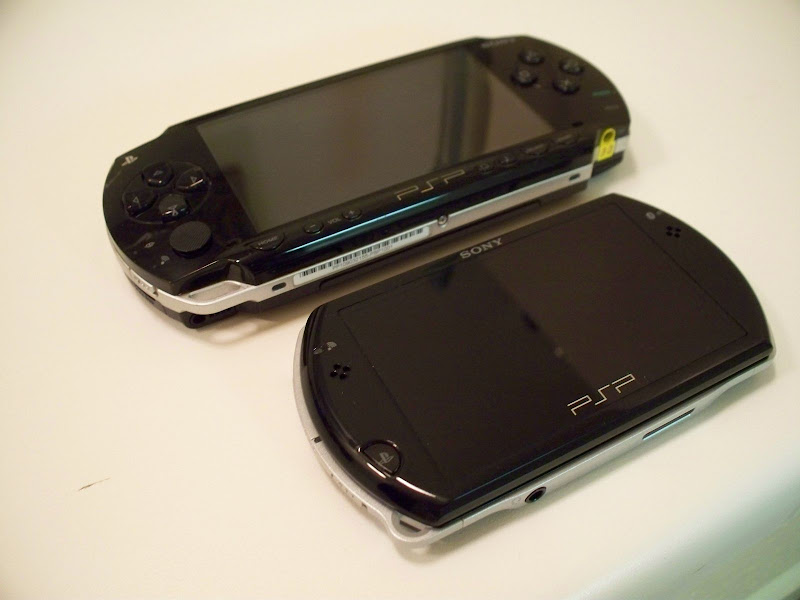
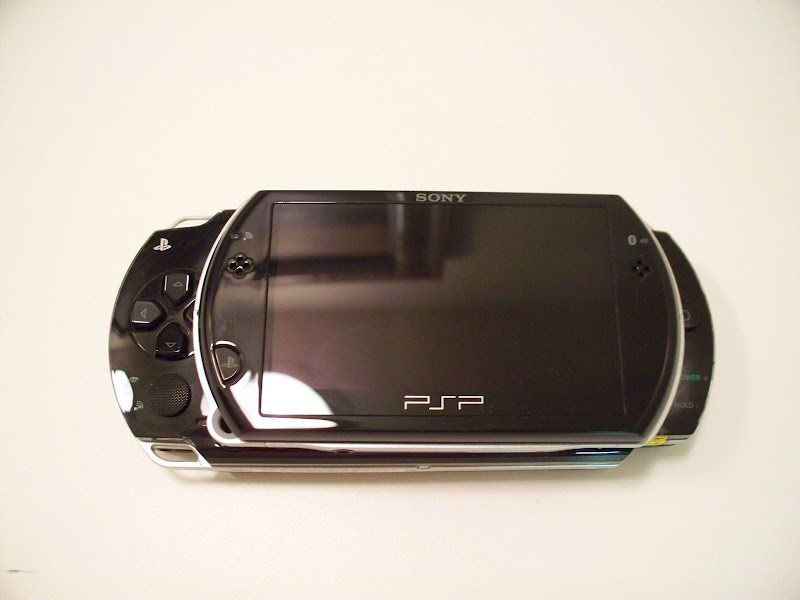
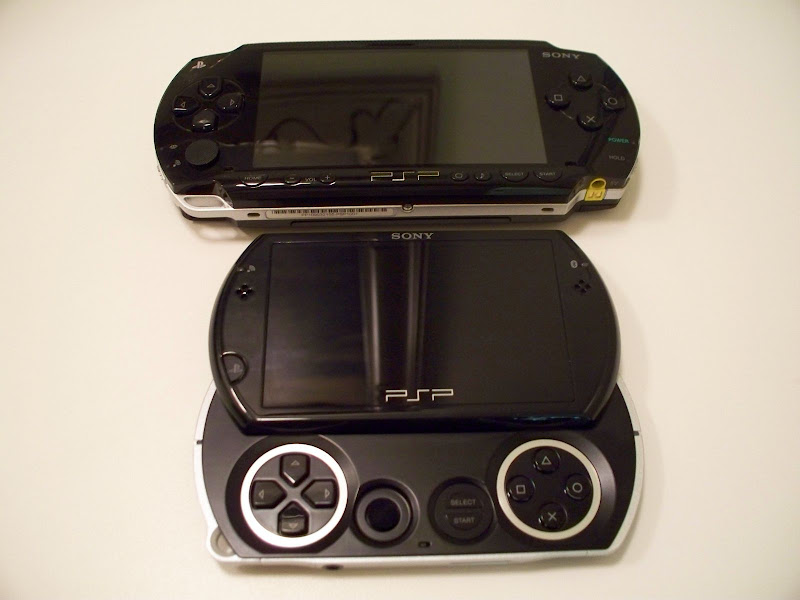
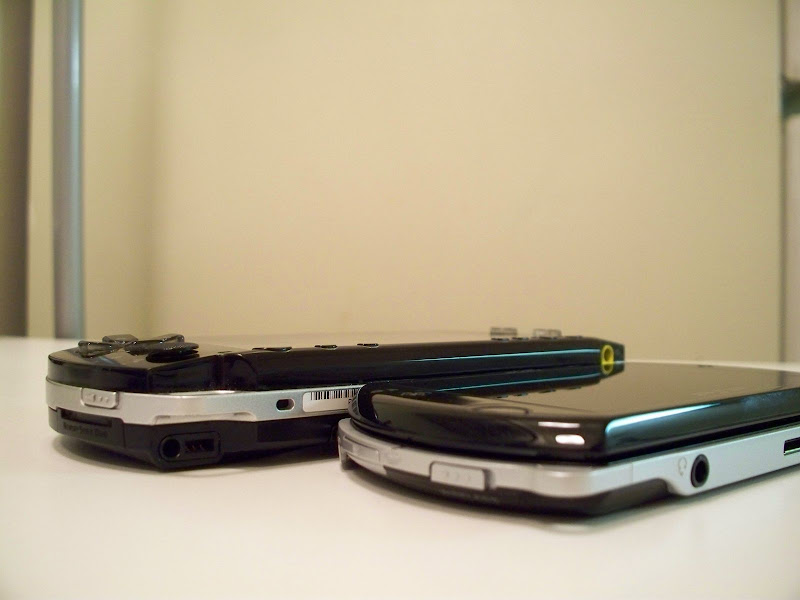
geek pr0n: PSPGo and PSP Phat (PSP-1001) side-by-side shots
i know. i'm that guy. after debating about it, i decided to go out and upgrade to a PSPGo. here are some quick shots of it next to its older and phatter PSP 1001 brother.
enjoy :)
enjoy :)
Friday, November 20, 2009
thoughts of a launch psp owner (post 4 1/2 years)
Well, I just realized today that I've owned my Sony PSP for almost 4 1/2 years! I originally purchased my PSP on launch day way back in March 24th, 2005. Â The PSP's superior screen and hardware (running nearly a full ps2 processor) impressed me from the start but would that alone make the PSP a competitor to the already successful Nintendo DS? Â Would Sony get a foothold in the portable gaming sect?
After 4 1/2 years, I thought I'd recap on my experience with the PSP (being that I have also owned a Nintendo DS) and my thoughts and reflections. Â Keep reading for the full scoop.
After 4 1/2 years, I thought I'd recap on my experience with the PSP (being that I have also owned a Nintendo DS) and my thoughts and reflections. Â Keep reading for the full scoop.
Wednesday, November 11, 2009
you're doing it wrong! (rant)
<rant>
wow, just wow. that's all i can say really these days whenever i read another article on the industries who seem to have held onto their old and dying business models biting the hand that feeds them.
as you can probably already tell, today's post is a soap-box rant which does not reflect the opinions of tech-rx or its owners.
keep on reading for a full fledged yo-momma rant on the music, video and newspaper industries.
wow, just wow. that's all i can say really these days whenever i read another article on the industries who seem to have held onto their old and dying business models biting the hand that feeds them.
as you can probably already tell, today's post is a soap-box rant which does not reflect the opinions of tech-rx or its owners.
keep on reading for a full fledged yo-momma rant on the music, video and newspaper industries.
Wednesday, October 28, 2009
post release: Windows 7, homegroups and me
Microsoft released the much anticipated Windows 7 OS to retail on Friday Oct 22, 2009.  The general consensus among the majority is that it is indeed a great OS and worth the upgrade (especially if you avoided Vista and are still on XP). Upgrades from XP and Vista to Windows 7 have been pretty smooth for the most part (minus the fiasco w/the Student Windows 7 upgrade problems).
This last weekend I finally clean installed Windows 7 Ultimate Edition Retail on my Wind and HP (prior to this I was running beta/rc versions of Windows 7).  I also received my Windows 7 license for my desktop and did another clean install (wiping vista right off) of Windows 7 on it.  Previous OS upgrades have taught me one thing; upgrading can/will bite you in the end.  I recommend backing up data and doing a clean install to avoid any possible issues that may crop up later down the road (ie driver incompatibilities, software that doesn't work on Win7, crashing).  So my advice, if possible clean install. Yes, its more work to start with but may save you some and frustration down the road.
After my installs were completed, the first thing i did was setup networking on the machines and in Windows 7 case, join a Homegroup. Keep reading for more info on my homegroups and media sharing experience.
This last weekend I finally clean installed Windows 7 Ultimate Edition Retail on my Wind and HP (prior to this I was running beta/rc versions of Windows 7).  I also received my Windows 7 license for my desktop and did another clean install (wiping vista right off) of Windows 7 on it.  Previous OS upgrades have taught me one thing; upgrading can/will bite you in the end.  I recommend backing up data and doing a clean install to avoid any possible issues that may crop up later down the road (ie driver incompatibilities, software that doesn't work on Win7, crashing).  So my advice, if possible clean install. Yes, its more work to start with but may save you some and frustration down the road.
After my installs were completed, the first thing i did was setup networking on the machines and in Windows 7 case, join a Homegroup. Keep reading for more info on my homegroups and media sharing experience.
Thursday, October 22, 2009
fall 2009 and some geek thoughts, reflections
Well, I've decided to blog on a more regular basis (at least once a week) and thought I'd start with a nice old op-ed piece on this years tech/geek news and trends and possible future ones.
Microsoft tries to redeem itself for Vista by accelerating development of Windows 7 and to everyone's delight, it appeases most with its updated UI and performance.
Netbooks became a household name and have started to grow out of its own genre. Nvidia Ion chips are now starting to appear in the latest netbooks ( Asus and HP were the first to offer) and seem to do a great job in playing back HD content. Touchscreen are starting to appear more and more in both netbooks and normal laptops.
Add on top of that the prospects of Microsoft and Apple's 'new' tablet offerings. Nintendo in spring of 2009, released its updated DS model the DSi (a touchscreen based portable console) to its category dominating DS Lite. Android devices started to finally hit market with HTC offering some very tasty hardware (HTC Hero, upcoming Leo) and Motorola making a comeback after its somewhat fall from fame (razr made and then broke them, moto q was a disaster) with the new Android based Cliq and Motoblur (both touchscreen/slider based phones).
Windows 7 teases us with the Surface Addon Pack that turns select multitouch touchscreen pcs/laptops/tablets into a mini Microsoft Surface. Google announces its making its own OS for netbooks/devices. Apple updates its iPod lineup and releases the much anticipated Snow Leopard.
2009 sure seems to be the year of touch and user interfaces.
Microsoft tries to redeem itself for Vista by accelerating development of Windows 7 and to everyone's delight, it appeases most with its updated UI and performance.
Netbooks became a household name and have started to grow out of its own genre. Nvidia Ion chips are now starting to appear in the latest netbooks ( Asus and HP were the first to offer) and seem to do a great job in playing back HD content. Touchscreen are starting to appear more and more in both netbooks and normal laptops.
Add on top of that the prospects of Microsoft and Apple's 'new' tablet offerings. Nintendo in spring of 2009, released its updated DS model the DSi (a touchscreen based portable console) to its category dominating DS Lite. Android devices started to finally hit market with HTC offering some very tasty hardware (HTC Hero, upcoming Leo) and Motorola making a comeback after its somewhat fall from fame (razr made and then broke them, moto q was a disaster) with the new Android based Cliq and Motoblur (both touchscreen/slider based phones).
Windows 7 teases us with the Surface Addon Pack that turns select multitouch touchscreen pcs/laptops/tablets into a mini Microsoft Surface. Google announces its making its own OS for netbooks/devices. Apple updates its iPod lineup and releases the much anticipated Snow Leopard.
2009 sure seems to be the year of touch and user interfaces.
Sunday, September 27, 2009
Windows 7 Quickie: Setting up TV recording and sharing to other Windows 7 computers (turn windows 7 into a dvr / media server)
again, its been far too long since i've last posted. today i thought i'd just outline the basics on how to use your Windows 7, with proper hardware, to record live tv and also share with other Windows 7 computers on your network. This will allow you to have a centralized tv recording computer/server that can also transcode and stream the tv to other clients in your Homegroup.
i plan to briefly go over what you need for hardware and how to setup Windows 7 to do this.
i plan to briefly go over what you need for hardware and how to setup Windows 7 to do this.
Saturday, August 22, 2009
Windows 7 and Centralized TV Recording, Sharing
Microsoft's upcoming Windows 7 (Win7) retail release on Oct 22, 2009 is a highly anticipated release compared to the disaster that was the Vista launch only 3 years prior. Performance and GUI/UI changes have really helped Win7 grab the eye of most geek and computer user out there. Most blogs and sites tout the performance boosts and the pretty os tweaks. Me, i like Win7 for the improvements with Media Center.
keep reading for some quick notes and video of my wind and ps3 streaming tv from my main hp.
keep reading for some quick notes and video of my wind and ps3 streaming tv from my main hp.
Wednesday, July 15, 2009
the future is soon (op-ed)
well, its been a while since i've posted and i apologize for that. silly work, life and summer stuff. anywho, i thought i'd get back to posting on more regular basis (in case i actually have followers/readers, j/k i love you all!).
today post is an op-ed blog on what i am predicting or think (hope?) a few of the next big things will be in the upcoming few years. we just saw twitter hit mainsteam this last march, facebook a while back, iphones are common place, wiis can be found on the shelves.
so, whats next? keep reading for this geeks predictions and geek ramblings.
today post is an op-ed blog on what i am predicting or think (hope?) a few of the next big things will be in the upcoming few years. we just saw twitter hit mainsteam this last march, facebook a while back, iphones are common place, wiis can be found on the shelves.
so, whats next? keep reading for this geeks predictions and geek ramblings.
Tuesday, June 16, 2009
Windows 7 RC, Recorded TV Shows and DLNA Streaming to PS3
well, today i was finally cleaning up my laptop and decided i'd try to setup the media sharing components again. i currently have my ps3 connected via a gigabit wired connection and my laptop using 802.11N so speed connection speeds should not be an issue with HD content streaming. it seemed that when i had my ps3 connected via wifi i had some media server disconnect issues (however that may have been related to my older router too, currently using an apple airport extreme base w/nas).
my laptop is currently running windows 7 rc build as its main os due to the fact that win 7 lets you use and record clearQAM channels (that alone convinced me to stay with win7). however, i did not remember having any luck playing my tv shows from my ps3 via the media center sharing. mp4 files worked fine but tv shows always gave me the usual cannot play back file error.
i have no idea what update added this feature but kudos to microsoft on that feature!! this not only lets me use my PS3 as a media center extender but also any other pc can playback files via DLNA client. (i am assuming this since i have not tested). keep reading for more details and the video demo.
my laptop is currently running windows 7 rc build as its main os due to the fact that win 7 lets you use and record clearQAM channels (that alone convinced me to stay with win7). however, i did not remember having any luck playing my tv shows from my ps3 via the media center sharing. mp4 files worked fine but tv shows always gave me the usual cannot play back file error.
i have no idea what update added this feature but kudos to microsoft on that feature!! this not only lets me use my PS3 as a media center extender but also any other pc can playback files via DLNA client. (i am assuming this since i have not tested). keep reading for more details and the video demo.
Sunday, May 31, 2009
Samsung NC10 insta-review (netbook)
PROs:
CONs:
- awesome battery life, the best so far (about 4-5hours in real world; rated at 6hrs)
- nice 10" display,
- solid build feel
- normal hdd, memory card slots, normal lan and vga ports
- pinch zooming touchpad (can do pinch gesture in IE and zoom in and out)
CONs:
- small touchpad
- perhaps a little heavier than dell/hp netbooks (but also makes it feel sturdier built)
Overall: definitely a good netbook and i give it a 9/10.
i liked how long the battery lasted on it and how the keyboard had pitched keys (angled at edges and more space between keys than the dell and hp flush keys).Â
vga and lan ports also handy and gives it an edge over the other netbooks that opted to use proprietary adapters. however the smaller touchpad is a bit annoying and the only main negative
for full specs, check out Samsung's official page over here:
Sunday, May 17, 2009
Dell Mini 10 insta-review (xp edition)
PROs:
CONs:
Overall: seamonkey gives a thumbs up to it: 8/10
another good netbook w/a good keyboard layout and larger touchpad area. initially the touchpad left and right click buttons were hard to get used to since its built into the touchpad itself. however the clicking tactile feedback for them makes it easier to adjust.
the biggest con to the dell mini10 is its lack of a vga out connector for an external monitor; however instead it does have an HDMI output to allow it to hook up to most new hdtvs.
Nice that it uses a normal harddrive and in turn has tons more space for applications. This netbook falls nicely into the 10" netbook genre with the most common features that seem to define this area: atom cpu, nearly full keyboards, 2 to 3 usb, hdd or ssd (larger for hdd), webcam, memorycard reader. One defining feature is the hdmi out but this does again come at the cost of a vga out.Â
- very nice keyboard, and key layout
- larger touchpad
- nice display
- decent sound for a netbook
- good battery life
- large normal harddrive
- hdmi output for hooking up to hdtvs
CONs:
- touchpad buttons are actually built into touchpad (takes a while to get used to)
- glossy display hard to see in direct sunlight (but this is normal for glossy displays)
- normal harddrive so is suspectible to jars/dropping (unlike ssd based netbooks)
- Function keys require using the FN button to use (again a minor complaint)
- no VGA-output (can't hook up to most normal computer monitors)
Overall: seamonkey gives a thumbs up to it: 8/10
another good netbook w/a good keyboard layout and larger touchpad area. initially the touchpad left and right click buttons were hard to get used to since its built into the touchpad itself. however the clicking tactile feedback for them makes it easier to adjust.
the biggest con to the dell mini10 is its lack of a vga out connector for an external monitor; however instead it does have an HDMI output to allow it to hook up to most new hdtvs.
Nice that it uses a normal harddrive and in turn has tons more space for applications. This netbook falls nicely into the 10" netbook genre with the most common features that seem to define this area: atom cpu, nearly full keyboards, 2 to 3 usb, hdd or ssd (larger for hdd), webcam, memorycard reader. One defining feature is the hdmi out but this does again come at the cost of a vga out.Â
Wednesday, May 13, 2009
Windows 7 RC, Media Center, and ClearQAM. FINALLY!!
well, i finally broke down and decided to upgrade my vista ultimate installation to windows 7 rc. i thought i'd help out microsoft and send my installation logs (option when you install) and also do a straight upgrade from Vista Ultimate vs doing a clean install (which i would normally do).
the upgrade went almost too easy and i already found a reason to love Windows 7 and Media Center. ClearQAM support! Keep reading for the rest of my initial impressions and see windows 7 media center w/some ClearQAM in action!
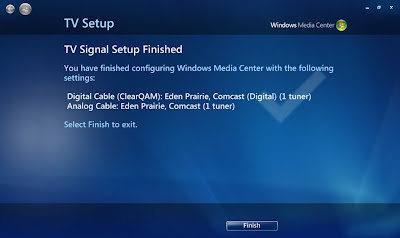
the upgrade went almost too easy and i already found a reason to love Windows 7 and Media Center. ClearQAM support! Keep reading for the rest of my initial impressions and see windows 7 media center w/some ClearQAM in action!
Sunday, April 26, 2009
my HP DV6700T + osx leopard, hackintoshing round 2
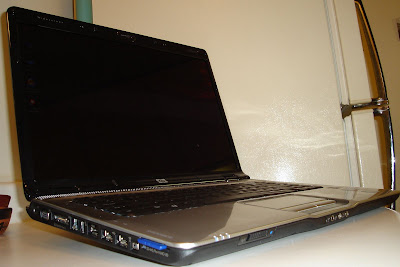
well, as my tweets may tell; i've decided to redo my os setup on my HP DV6700T laptop. for a little while i was trying (not very hard) to sell my hp laptop since i was using my air or wind more when on the go. however after realizing the costs of a macbook pro and how much i prob would get for my hp i decided on keeping my hp and in turn relook into hackintoshing it.
last year i tried using a kalyway osx86 distro/installer and had pretty good success except for no builtin wifi, shaddy shutdown/audio issues (you either get working shutdown and no audio, or audio and having to hard power down laptop; doh!) which are two big negatives if your trying to use it as your main os.
however this time i decided i'd try to use a newer distro/installer, iDeneb 1.4 (it also was patched to 10.5.6; another thing that usually broke my setup was updating!).
keep reading for my thoughts, list of working items, tips and a video demo.
update! sd/mmc/ms card reader working (see below)
Monday, April 13, 2009
confessions of a multi-booting geek
yea. i am one of those geeks. the type that gets or builds a new pc/laptop/netbook and then tries to cram as many operating systems on it as i can.
at one point in my life i recall having a multiboot setup of 5 different os's. recently i've triple booted my msi wind w/3 os's and my macbook air w/a mere dual boot...
at one point in my life i recall having a multiboot setup of 5 different os's. recently i've triple booted my msi wind w/3 os's and my macbook air w/a mere dual boot...
Subscribe to:
Posts (Atom)